> ## Documentation Index
> Fetch the complete documentation index at: https://docs.stably.ai/llms.txt
> Use this file to discover all available pages before exploring further.
# Auto-heal Tests
> Stably AI automatically heals outdated tests to minimize maintenance overhead and flaky tests, keeping your test suite reliable and up-to-date.
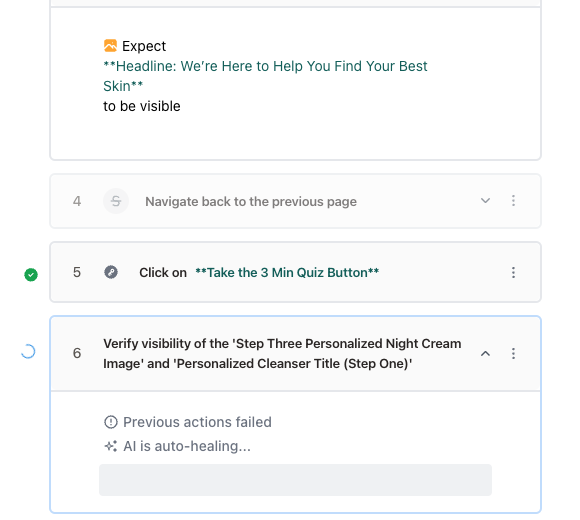
Stably AI can automatically heal outdated tests to minimize maintenance overhead and flaky tests.
 ## How does it work?
Stably AI uses a combination of the step description, test run history, and [knowledge of your product](/core-configuration/app-knowledge) to make changes to the test.
## What types of test changes can Stably AI make?
Stably AI can make the following changes to your tests:
* Locator changes (e.g. `page.getByRole('button', { name: 'Submit' })` to `page.getByRole('button', { name: 'Save' })`)
* Minor user flow changes (e.g. now you need to select a country before entering your email)
* Handle dynamic logic (e.g. now the page has a loading state)
After Stably AI makes a change, it will show you a preview of the changes and ask for confirmation.
In general, our users have reported saving 10–20 hours per month on maintenance.
## Can I exclude certain steps from being healed?
Yes, you can exclude certain steps from being healed by changing their mode to **Strict**.
## How does it work?
Stably AI uses a combination of the step description, test run history, and [knowledge of your product](/core-configuration/app-knowledge) to make changes to the test.
## What types of test changes can Stably AI make?
Stably AI can make the following changes to your tests:
* Locator changes (e.g. `page.getByRole('button', { name: 'Submit' })` to `page.getByRole('button', { name: 'Save' })`)
* Minor user flow changes (e.g. now you need to select a country before entering your email)
* Handle dynamic logic (e.g. now the page has a loading state)
After Stably AI makes a change, it will show you a preview of the changes and ask for confirmation.
In general, our users have reported saving 10–20 hours per month on maintenance.
## Can I exclude certain steps from being healed?
Yes, you can exclude certain steps from being healed by changing their mode to **Strict**.
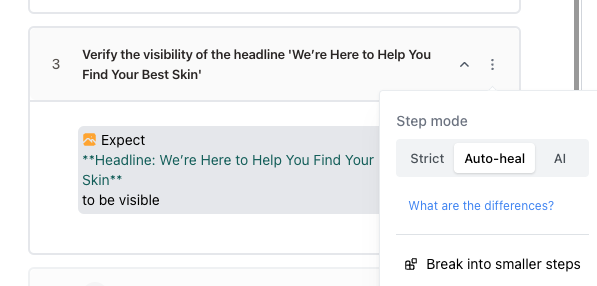 There are three modes for a step:
* Strict: Executes the recorded steps exactly as they were captured, without any adaptability.
* Auto-heal: Uses recorded actions by default, but can automatically adjust for minor UI changes.
* AI: Generates new actions for each run based on the step description. Ideal for highly dynamic steps, such as selecting the last day of the current month.
## Can I control the healing sensitivity?
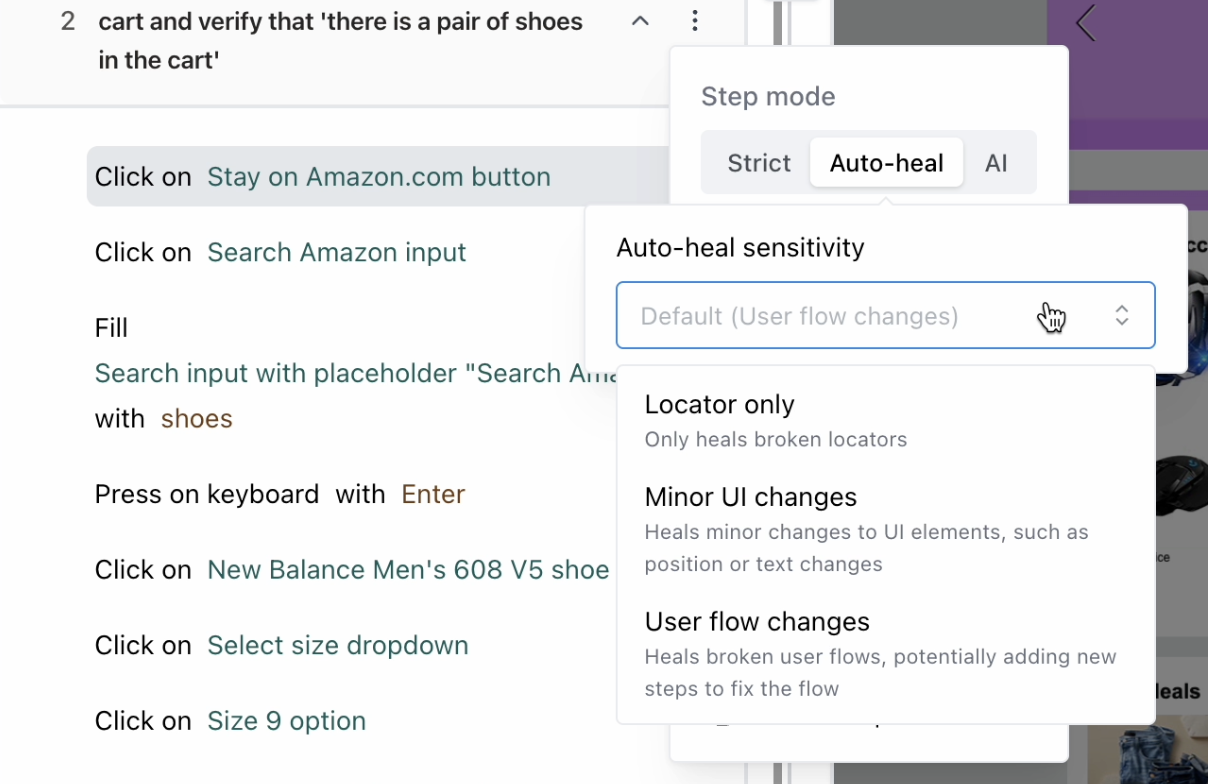
Yes, you can adjust the healing sensitivity for any step with the following options:
* Locator only: Only heals broken locators.
* Minor UI changes: Heals minor changes to UI elements, such as position or text changes.
* User flow changes: Heals broken user flows, potentially adding new steps to fix the flow.
There are three modes for a step:
* Strict: Executes the recorded steps exactly as they were captured, without any adaptability.
* Auto-heal: Uses recorded actions by default, but can automatically adjust for minor UI changes.
* AI: Generates new actions for each run based on the step description. Ideal for highly dynamic steps, such as selecting the last day of the current month.
## Can I control the healing sensitivity?
Yes, you can adjust the healing sensitivity for any step with the following options:
* Locator only: Only heals broken locators.
* Minor UI changes: Heals minor changes to UI elements, such as position or text changes.
* User flow changes: Heals broken user flows, potentially adding new steps to fix the flow.
 You can also adjust the default healing sensitivity for all steps in Settings > AI Agents.
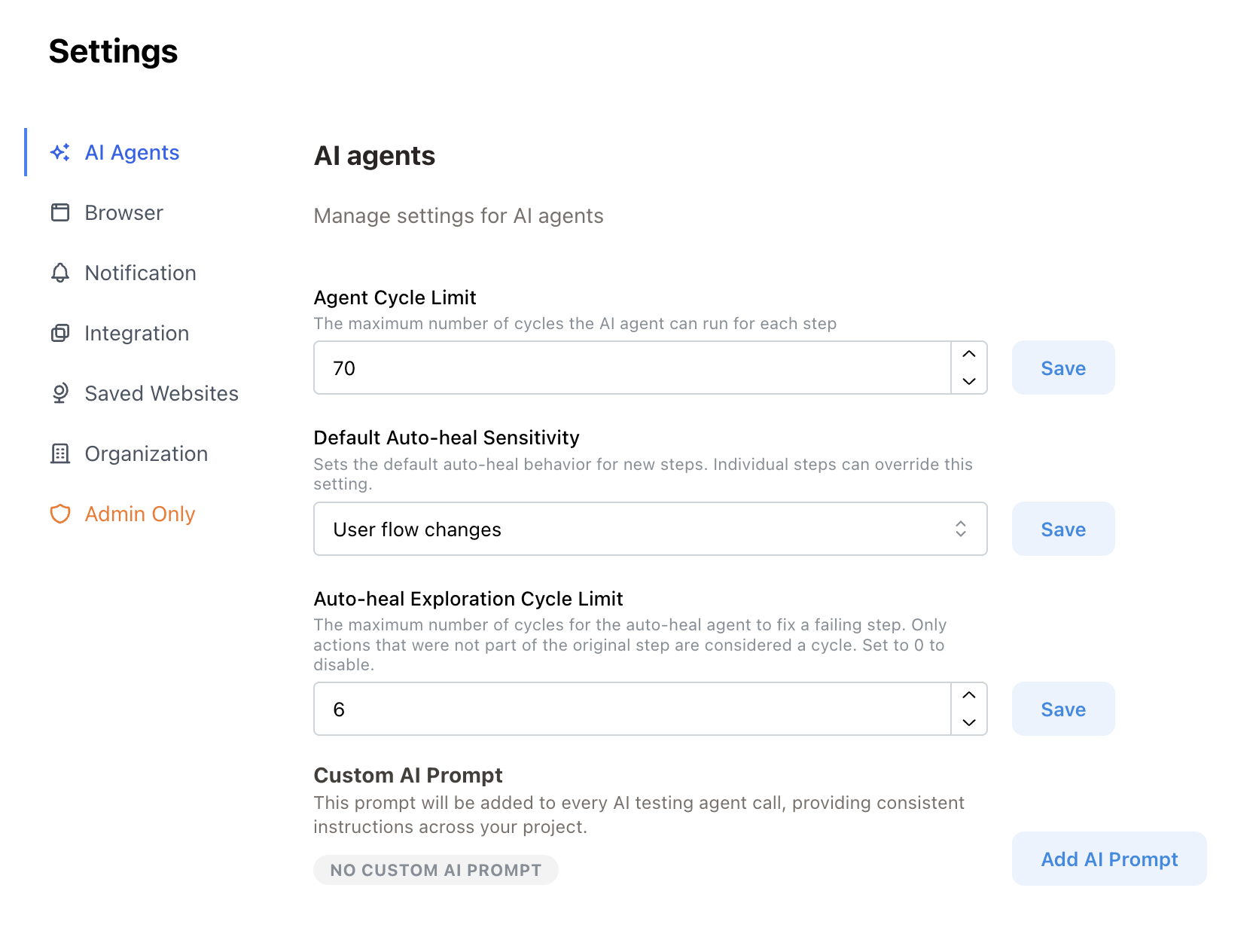 For minor UI changes and user flow changes, you can specify an exploration cycle limit. Only actions that were not part of the original step are considered a cycle.