> ## Documentation Index
> Fetch the complete documentation index at: https://docs.stably.ai/llms.txt
> Use this file to discover all available pages before exploring further.
# Email Inbox
> Receive and extract data from emails in your tests using Stably's email SDK.
Stably's email inbox lets you receive emails during tests and extract structured data like OTPs and magic links. Each inbox is scoped to your test, preventing interference between parallel runs.
**Why use email inbox?** Testing email-based flows (sign-up verification, password reset, magic links) requires receiving real emails. The inbox handles email delivery, filtering, and AI-powered extraction so you can focus on testing your application.
## Installation
Install the `@stablyai/email` package:
```ts theme={null}
import { Inbox } from '@stablyai/email';
```
Works with any test framework — Playwright, Jest, Vitest, Cypress, or backend scripts.
## Finding Your Email Address
Your organization's email address follows the pattern `{org-name}@mail.stably.ai`. To find your specific address:
1. **Settings**: Go to [**Settings > Email Inbox**](https://app.stably.ai/settings?tab=email) in your Stably project
2. **In code**: Call `Inbox.build()` — the returned `inbox.address` contains your org's full email
**Allowlisting**: If your email provider blocks automated emails, add `mail.stably.ai` to your allowlist.
## Viewing Received Emails
You can view all emails received by your inbox directly from the Stably web portal or programmatically via the SDK.
Go to [**Settings > Email Inbox**](https://app.stably.ai/settings?tab=email) in your Stably project. The bottom of the page shows a list of all received emails with sender, recipient, subject, and date.
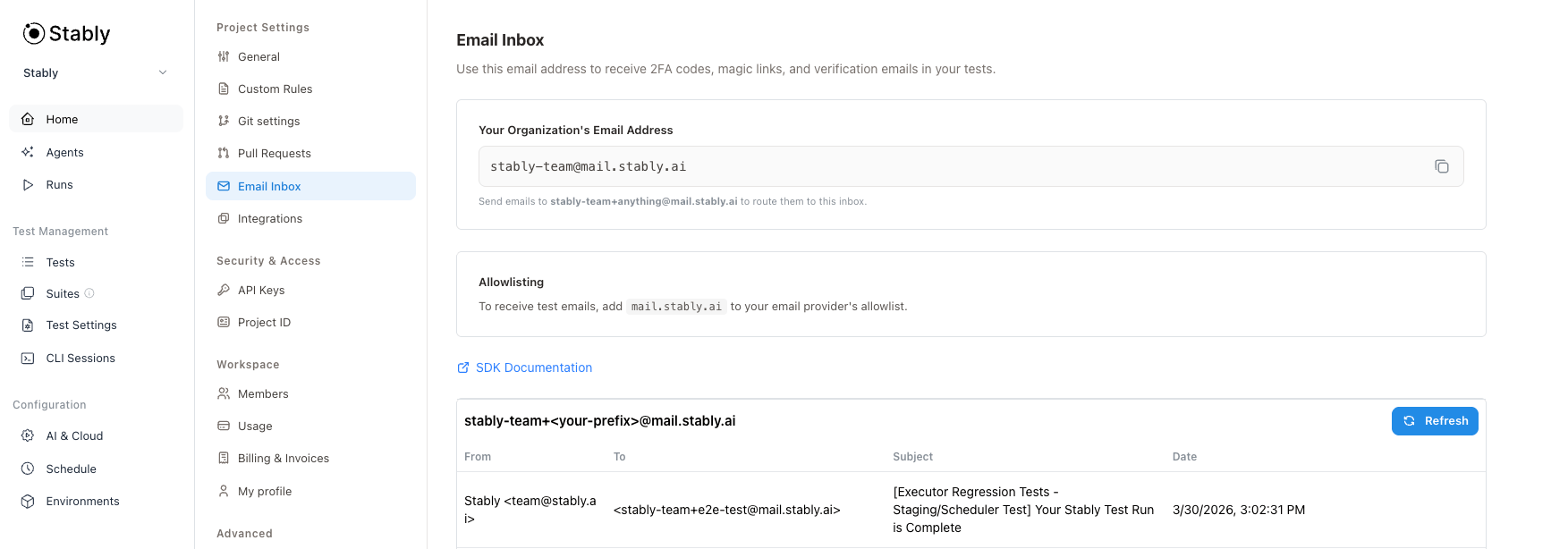 Use the **Refresh** button to fetch the latest emails. The "To" column shows which suffixed address each email was sent to, making it easy to trace emails back to specific test runs.
You can list received emails programmatically:
```ts theme={null}
const inbox = await Inbox.build();
const { emails } = await inbox.listEmails({ includeOlder: true });
for (const email of emails) {
console.log(`${email.from.address} → ${email.subject} (${email.receivedAt})`);
}
```
See [inbox.listEmails](#inboxlistemails) and [inbox.getEmail](#inboxgetemail) for full details.
## Email Object
Methods like `inbox.listEmails()`, `inbox.waitForEmail()`, and `inbox.getEmail()` return `Email` objects with these properties:
| Property | Type | Description |
| ------------ | -------------------------------------- | --------------------------------------------------- |
| `id` | string | Unique email identifier |
| `mailbox` | string | The mailbox containing this email (e.g., `"INBOX"`) |
| `from` | `{ address: string, name?: string }` | Sender |
| `to` | `{ address: string, name?: string }[]` | Recipients |
| `subject` | string | Email subject line |
| `receivedAt` | Date | When the email was received |
| `text` | string? | Plain text body (if available) |
| `html` | string\[]? | HTML body parts (if available) |
## Basic Usage
Create an inbox, trigger an email from your app, wait for it to arrive, and extract the data you need:
```ts theme={null}
import { Inbox } from '@stablyai/email';
import { z } from 'zod';
test('login with OTP', async ({ page }) => {
const inbox = await Inbox.build({ suffix: `test-${Date.now()}` });
await page.goto('/login');
await page.fill('#email', inbox.address);
await page.click('#send-otp');
const email = await inbox.waitForEmail({ subject: 'verification' });
const { data: otp } = await inbox.extractFromEmail({ id: email.id, prompt: 'Extract the OTP code' });
await page.fill('#otp', otp);
await page.click('#verify');
await inbox.deleteAllEmails();
});
```
## Inbox.build
Creates an inbox instance scoped to your test. Requires `STABLY_API_KEY` and `STABLY_PROJECT_ID` environment variables (or pass them directly).
```ts theme={null}
const inbox = await Inbox.build();
// inbox.address → "my-org@mail.stably.ai"
const inbox = await Inbox.build({ suffix: `test-${Date.now()}` });
// inbox.address → "my-org+test-1706621234567@mail.stably.ai"
// Explicit credentials (overrides environment variables)
const inbox = await Inbox.build({
suffix: `test-${Date.now()}`,
apiKey: 'your-api-key',
projectId: 'your-project-id',
});
```
### Options
| Option | Type | Description |
| ----------- | ------ | -------------------------------------------------------------------------------------- |
| `suffix` | string | Suffix for test isolation (e.g., `"test-123"` creates `"org+test-123@mail.stably.ai"`) |
| `apiKey` | string | Stably API key. Defaults to `STABLY_API_KEY` environment variable |
| `projectId` | string | Stably project ID. Defaults to `STABLY_PROJECT_ID` environment variable |
Using a unique `suffix` for each test is highly recommended. It ensures tests running in parallel don't interfere with each other by giving each test its own isolated inbox address.
### Inbox Properties
| Property | Type | Description |
| ----------- | ------------------- | ----------------------------------------------- |
| `address` | string | Full email address (with suffix if provided) |
| `suffix` | string \| undefined | The suffix used when creating the inbox |
| `createdAt` | Date | When the inbox was created (used for filtering) |
The inbox automatically filters out emails received before `createdAt`, so you only see emails from your current test.
## inbox.waitForEmail
Polls until a new email matching your filters arrives. Only sees emails received after the inbox was created.
```ts theme={null}
const email = await inbox.waitForEmail({ subject: 'Welcome' });
const email = await inbox.waitForEmail({
from: 'noreply@example.com',
subject: 'verification',
timeoutMs: 60000, // default: 120000 (2 min)
pollIntervalMs: 5000, // default: 3000 (3 sec)
});
```
### Options
| Option | Type | Description |
| ---------------- | ------------------------- | --------------------------------------------- |
| `from` | string | Filter by sender address |
| `subject` | string | Filter by subject (contains match) |
| `subjectMatch` | `'contains'` \| `'exact'` | Subject matching mode (default: `'contains'`) |
| `timeoutMs` | number | Max wait time in ms (default: 120000) |
| `pollIntervalMs` | number | Poll interval in ms (default: 3000) |
Throws `EmailTimeoutError` if no matching email arrives within the timeout.
## inbox.extractFromEmail
Extracts data from an email using AI. Returns `{ data, reason }` where `data` is the extracted value and `reason` describes how the extraction was performed.
```ts theme={null}
// String extraction - returns { data: string, reason: string }
const { data: otp, reason } = await inbox.extractFromEmail({ id: email.id, prompt: 'Extract the 6-digit OTP code' });
console.log(reason); // e.g., "Found a 6-digit code in the email body"
// Handling extraction failure
try {
const { data: otp } = await inbox.extractFromEmail({ id: email.id, prompt: 'Extract the 6-digit OTP code' });
} catch (error) {
if (error instanceof EmailExtractionError) {
console.log(error.reason); // e.g., "No OTP code found in the email"
}
}
// Structured extraction with Zod schema - returns { data: T, reason: string }
const { data } = await inbox.extractFromEmail({
id: email.id,
prompt: 'Extract the OTP code',
schema: z.object({ otp: z.string() }),
});
console.log(data.otp); // typed string
// Multiple fields
const { data: order } = await inbox.extractFromEmail({
id: email.id,
prompt: 'Extract the verification URL and expiration time',
schema: z.object({
url: z.string().url(),
expiresIn: z.string(),
}),
});
console.log(order.url, order.expiresIn);
```
The method throws `EmailExtractionError` if extraction fails.
## inbox.listEmails
Lists emails in the inbox. By default, only returns emails received after the inbox was created.
```ts theme={null}
const { emails } = await inbox.listEmails();
// Include emails from before inbox creation
const { emails } = await inbox.listEmails({ includeOlder: true });
const { emails, nextCursor } = await inbox.listEmails({
from: 'notifications@example.com',
subject: 'Order',
limit: 10,
});
```
### Options
| Option | Type | Description |
| -------------- | ------------------------- | ------------------------------------------------------- |
| `from` | string | Filter by sender address |
| `subject` | string | Filter by subject (contains match) |
| `subjectMatch` | `'contains'` \| `'exact'` | Subject matching mode (default: `'contains'`) |
| `limit` | number | Max emails to return (default: 20, max: 100) |
| `cursor` | string | Pagination cursor from previous response |
| `since` | Date | Override the default `createdAt` filter |
| `includeOlder` | boolean | Set `true` to include emails from before inbox creation |
## inbox.getEmail
Gets a specific email by ID.
```ts theme={null}
const email = await inbox.getEmail(id);
console.log(email.subject, email.from.address);
```
## inbox.deleteEmail / inbox.deleteAllEmails
Delete emails to clean up after your test.
```ts theme={null}
await inbox.deleteEmail(email.id); // Delete single email
await inbox.deleteAllEmails(); // Delete all emails in this inbox
```
`deleteAllEmails()` only deletes emails sent to this inbox's address, not your entire org mailbox.
## Common Extraction Prompts
```ts theme={null}
// OTP / Verification code - simple string
const { data: otp } = await inbox.extractFromEmail({ id: email.id, prompt: 'Extract the OTP or verification code' });
// Magic link / Sign-in URL - simple string
const { data: url } = await inbox.extractFromEmail({ id: email.id, prompt: 'Extract the sign-in or verification URL' });
// Structured extraction with schema
const { data } = await inbox.extractFromEmail({
id: email.id,
prompt: 'Extract the OTP code',
schema: z.object({ otp: z.string() }),
});
console.log(data.otp);
// Order confirmation - multiple fields
const { data: order } = await inbox.extractFromEmail({
id: email.id,
prompt: 'Extract the order number and estimated delivery date',
schema: z.object({
orderNumber: z.string(),
deliveryDate: z.string(),
}),
});
console.log(order.orderNumber, order.deliveryDate);
```
## Using Fixtures
Create a reusable inbox fixture for automatic cleanup:
```ts theme={null}
import { test as base } from '@playwright/test';
import { Inbox } from '@stablyai/email';
const test = base.extend<{ inbox: Inbox }>({
inbox: async ({}, use, testInfo) => {
const inbox = await Inbox.build({ suffix: `test-${testInfo.testId}` });
await use(inbox);
await inbox.deleteAllEmails();
},
});
test('signup flow', async ({ page, inbox }) => {
await page.fill('#email', inbox.address);
await page.click('#signup');
const email = await inbox.waitForEmail({ subject: 'Welcome' });
// ...
});
```
## Troubleshooting
**Tests interfere with each other**
Use unique suffixes with `Inbox.build({ suffix: 'test-' + Date.now() })` to give each test its own isolated inbox. The inbox automatically filters to only show emails received after it was created.
Use the **Refresh** button to fetch the latest emails. The "To" column shows which suffixed address each email was sent to, making it easy to trace emails back to specific test runs.
You can list received emails programmatically:
```ts theme={null}
const inbox = await Inbox.build();
const { emails } = await inbox.listEmails({ includeOlder: true });
for (const email of emails) {
console.log(`${email.from.address} → ${email.subject} (${email.receivedAt})`);
}
```
See [inbox.listEmails](#inboxlistemails) and [inbox.getEmail](#inboxgetemail) for full details.
## Email Object
Methods like `inbox.listEmails()`, `inbox.waitForEmail()`, and `inbox.getEmail()` return `Email` objects with these properties:
| Property | Type | Description |
| ------------ | -------------------------------------- | --------------------------------------------------- |
| `id` | string | Unique email identifier |
| `mailbox` | string | The mailbox containing this email (e.g., `"INBOX"`) |
| `from` | `{ address: string, name?: string }` | Sender |
| `to` | `{ address: string, name?: string }[]` | Recipients |
| `subject` | string | Email subject line |
| `receivedAt` | Date | When the email was received |
| `text` | string? | Plain text body (if available) |
| `html` | string\[]? | HTML body parts (if available) |
## Basic Usage
Create an inbox, trigger an email from your app, wait for it to arrive, and extract the data you need:
```ts theme={null}
import { Inbox } from '@stablyai/email';
import { z } from 'zod';
test('login with OTP', async ({ page }) => {
const inbox = await Inbox.build({ suffix: `test-${Date.now()}` });
await page.goto('/login');
await page.fill('#email', inbox.address);
await page.click('#send-otp');
const email = await inbox.waitForEmail({ subject: 'verification' });
const { data: otp } = await inbox.extractFromEmail({ id: email.id, prompt: 'Extract the OTP code' });
await page.fill('#otp', otp);
await page.click('#verify');
await inbox.deleteAllEmails();
});
```
## Inbox.build
Creates an inbox instance scoped to your test. Requires `STABLY_API_KEY` and `STABLY_PROJECT_ID` environment variables (or pass them directly).
```ts theme={null}
const inbox = await Inbox.build();
// inbox.address → "my-org@mail.stably.ai"
const inbox = await Inbox.build({ suffix: `test-${Date.now()}` });
// inbox.address → "my-org+test-1706621234567@mail.stably.ai"
// Explicit credentials (overrides environment variables)
const inbox = await Inbox.build({
suffix: `test-${Date.now()}`,
apiKey: 'your-api-key',
projectId: 'your-project-id',
});
```
### Options
| Option | Type | Description |
| ----------- | ------ | -------------------------------------------------------------------------------------- |
| `suffix` | string | Suffix for test isolation (e.g., `"test-123"` creates `"org+test-123@mail.stably.ai"`) |
| `apiKey` | string | Stably API key. Defaults to `STABLY_API_KEY` environment variable |
| `projectId` | string | Stably project ID. Defaults to `STABLY_PROJECT_ID` environment variable |
Using a unique `suffix` for each test is highly recommended. It ensures tests running in parallel don't interfere with each other by giving each test its own isolated inbox address.
### Inbox Properties
| Property | Type | Description |
| ----------- | ------------------- | ----------------------------------------------- |
| `address` | string | Full email address (with suffix if provided) |
| `suffix` | string \| undefined | The suffix used when creating the inbox |
| `createdAt` | Date | When the inbox was created (used for filtering) |
The inbox automatically filters out emails received before `createdAt`, so you only see emails from your current test.
## inbox.waitForEmail
Polls until a new email matching your filters arrives. Only sees emails received after the inbox was created.
```ts theme={null}
const email = await inbox.waitForEmail({ subject: 'Welcome' });
const email = await inbox.waitForEmail({
from: 'noreply@example.com',
subject: 'verification',
timeoutMs: 60000, // default: 120000 (2 min)
pollIntervalMs: 5000, // default: 3000 (3 sec)
});
```
### Options
| Option | Type | Description |
| ---------------- | ------------------------- | --------------------------------------------- |
| `from` | string | Filter by sender address |
| `subject` | string | Filter by subject (contains match) |
| `subjectMatch` | `'contains'` \| `'exact'` | Subject matching mode (default: `'contains'`) |
| `timeoutMs` | number | Max wait time in ms (default: 120000) |
| `pollIntervalMs` | number | Poll interval in ms (default: 3000) |
Throws `EmailTimeoutError` if no matching email arrives within the timeout.
## inbox.extractFromEmail
Extracts data from an email using AI. Returns `{ data, reason }` where `data` is the extracted value and `reason` describes how the extraction was performed.
```ts theme={null}
// String extraction - returns { data: string, reason: string }
const { data: otp, reason } = await inbox.extractFromEmail({ id: email.id, prompt: 'Extract the 6-digit OTP code' });
console.log(reason); // e.g., "Found a 6-digit code in the email body"
// Handling extraction failure
try {
const { data: otp } = await inbox.extractFromEmail({ id: email.id, prompt: 'Extract the 6-digit OTP code' });
} catch (error) {
if (error instanceof EmailExtractionError) {
console.log(error.reason); // e.g., "No OTP code found in the email"
}
}
// Structured extraction with Zod schema - returns { data: T, reason: string }
const { data } = await inbox.extractFromEmail({
id: email.id,
prompt: 'Extract the OTP code',
schema: z.object({ otp: z.string() }),
});
console.log(data.otp); // typed string
// Multiple fields
const { data: order } = await inbox.extractFromEmail({
id: email.id,
prompt: 'Extract the verification URL and expiration time',
schema: z.object({
url: z.string().url(),
expiresIn: z.string(),
}),
});
console.log(order.url, order.expiresIn);
```
The method throws `EmailExtractionError` if extraction fails.
## inbox.listEmails
Lists emails in the inbox. By default, only returns emails received after the inbox was created.
```ts theme={null}
const { emails } = await inbox.listEmails();
// Include emails from before inbox creation
const { emails } = await inbox.listEmails({ includeOlder: true });
const { emails, nextCursor } = await inbox.listEmails({
from: 'notifications@example.com',
subject: 'Order',
limit: 10,
});
```
### Options
| Option | Type | Description |
| -------------- | ------------------------- | ------------------------------------------------------- |
| `from` | string | Filter by sender address |
| `subject` | string | Filter by subject (contains match) |
| `subjectMatch` | `'contains'` \| `'exact'` | Subject matching mode (default: `'contains'`) |
| `limit` | number | Max emails to return (default: 20, max: 100) |
| `cursor` | string | Pagination cursor from previous response |
| `since` | Date | Override the default `createdAt` filter |
| `includeOlder` | boolean | Set `true` to include emails from before inbox creation |
## inbox.getEmail
Gets a specific email by ID.
```ts theme={null}
const email = await inbox.getEmail(id);
console.log(email.subject, email.from.address);
```
## inbox.deleteEmail / inbox.deleteAllEmails
Delete emails to clean up after your test.
```ts theme={null}
await inbox.deleteEmail(email.id); // Delete single email
await inbox.deleteAllEmails(); // Delete all emails in this inbox
```
`deleteAllEmails()` only deletes emails sent to this inbox's address, not your entire org mailbox.
## Common Extraction Prompts
```ts theme={null}
// OTP / Verification code - simple string
const { data: otp } = await inbox.extractFromEmail({ id: email.id, prompt: 'Extract the OTP or verification code' });
// Magic link / Sign-in URL - simple string
const { data: url } = await inbox.extractFromEmail({ id: email.id, prompt: 'Extract the sign-in or verification URL' });
// Structured extraction with schema
const { data } = await inbox.extractFromEmail({
id: email.id,
prompt: 'Extract the OTP code',
schema: z.object({ otp: z.string() }),
});
console.log(data.otp);
// Order confirmation - multiple fields
const { data: order } = await inbox.extractFromEmail({
id: email.id,
prompt: 'Extract the order number and estimated delivery date',
schema: z.object({
orderNumber: z.string(),
deliveryDate: z.string(),
}),
});
console.log(order.orderNumber, order.deliveryDate);
```
## Using Fixtures
Create a reusable inbox fixture for automatic cleanup:
```ts theme={null}
import { test as base } from '@playwright/test';
import { Inbox } from '@stablyai/email';
const test = base.extend<{ inbox: Inbox }>({
inbox: async ({}, use, testInfo) => {
const inbox = await Inbox.build({ suffix: `test-${testInfo.testId}` });
await use(inbox);
await inbox.deleteAllEmails();
},
});
test('signup flow', async ({ page, inbox }) => {
await page.fill('#email', inbox.address);
await page.click('#signup');
const email = await inbox.waitForEmail({ subject: 'Welcome' });
// ...
});
```
## Troubleshooting
**Tests interfere with each other**
Use unique suffixes with `Inbox.build({ suffix: 'test-' + Date.now() })` to give each test its own isolated inbox. The inbox automatically filters to only show emails received after it was created.