> ## Documentation Index
> Fetch the complete documentation index at: https://docs.stably.ai/llms.txt
> Use this file to discover all available pages before exploring further.
# PR Testing
> Comprehensive AI testing on pull requests - both exploratory and regression testing
AI-powered exploratory testing that intelligently analyzes your code changes and performs comprehensive testing
Automated execution of your existing test suite to ensure new changes don't break existing functionality
## Overview
**AI-Powered Intelligent Testing**
Stably's exploratory testing analyzes your PR feature specifications and automatically performs comprehensive testing:
* Analyzes code changes and PR description to understand what functionality needs testing
* Intelligently navigates through your application
* Tests edge cases and feature user flows
* Posts detailed test reports with findings and UI/UX feedback
* Skips testing for changes that it can't test
**Automated Test Suite Execution**
Regression testing ensures existing functionality remains intact by running your established test suites:
* Executes your existing test suites on every pull request
* AI automatically keeps test cases up-to-date with your code changes
* Catches regressions before they reach your main branch
* Provides detailed pass/fail reports with failure analysis
* Test cases are version-controlled with your code
***
## Exploratory Testing
**Perfect for**: Augmenting your PR review process and working alongside your existing PR code review bots.
### Setup Process
The first step is to connect your GitHub repository to Stably:
1. Navigate to **Settings** > **GitHub PR Testing** in your Stably dashboard
2. Click **Install GitHub App**
3. This will connect your GitHub repository to Stably and enable automated testing on pull requests
GitLab and API-based triggers are coming soon for exploratory testing.
Next, configure which repository and branch Stably should monitor:
1. In the **Configure Repository** section:
* **GitHub Organization**: Select your GitHub organization or user account
* **Repository**: Choose the specific repository you want to enable PR testing for
* **Primary Branch**: Select the main branch (usually `main` or `master`)
2. Click **Save Configuration** to apply your settings
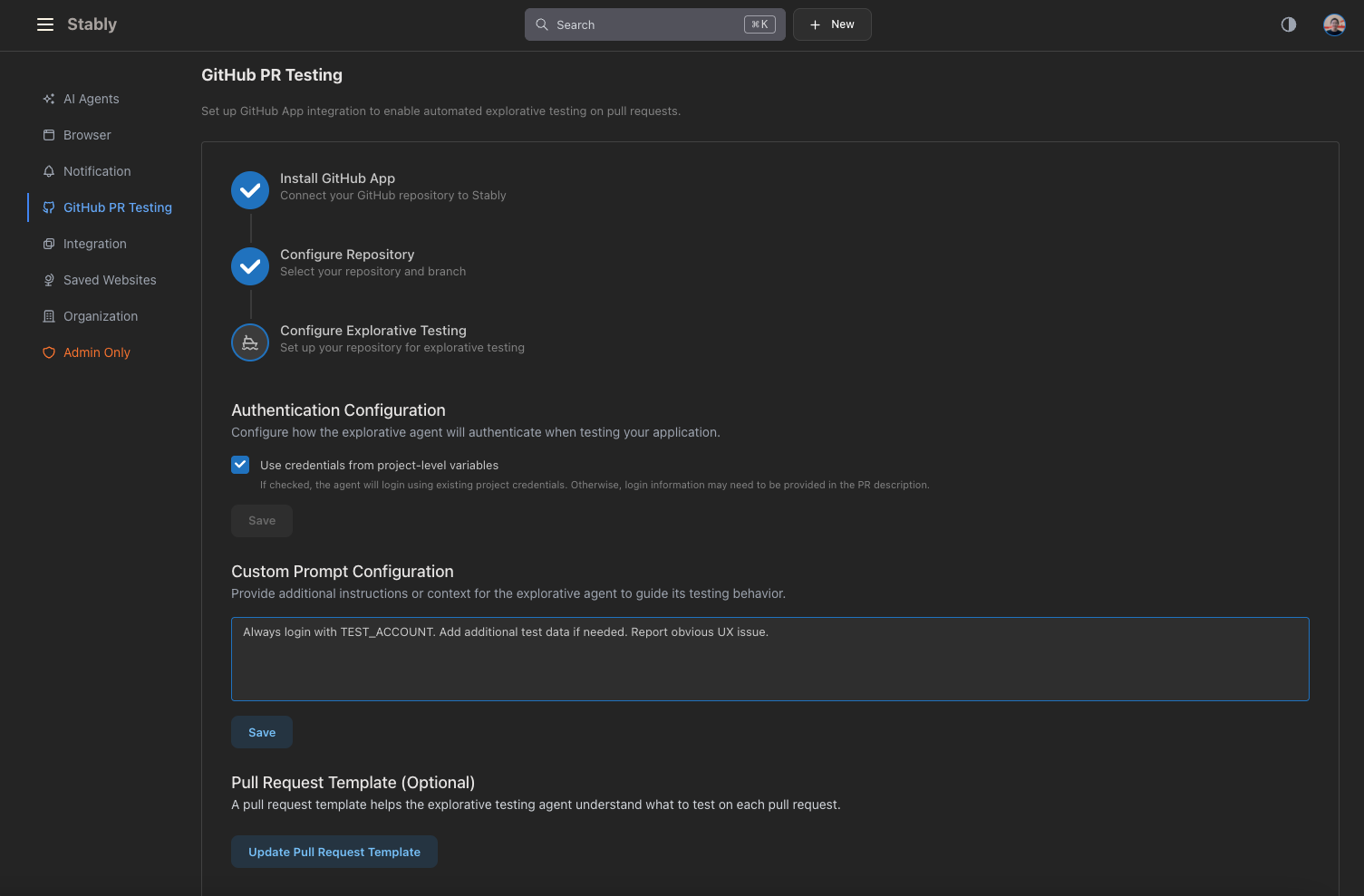
The final step involves setting up how exploratory testing will operate:
* **Use credentials from project-level variables**: Enable this option to have the agent log in using your existing project credentials
* If unchecked, login information may need to be provided in the PR description or custom prompts
Provide additional instructions or context for exploratory testing:
* Add specific testing instructions (e.g., "Always login with TEST\_ACCOUNT")
* Include additional test data requirements
* Specify particular areas of focus for testing (e.g. "The color schemes should be consistent across the app")
Set up a PR template to help exploratory testing understand what to test:
* Click **Update Pull Request Template** to configure
* The template helps the agent understand the context and scope of each pull request
* This ensures more targeted and relevant testing
 ### How Exploratory Testing Works
Once configured, exploratory testing will:
* **Automatically trigger** when new pull requests are created
* **Manually trigger** by commenting `@stablyai` on any pull request
The AI agent performs comprehensive testing by:
* Understanding the functionality affected by your changes
* Navigating through your application intelligently
* Testing edge cases and user workflows
* Validating both positive and negative scenarios
After testing completes, you'll receive:
* **Detailed test reports** posted as PR comments
* **Summary** of testing activities performed
* **Objectives coverage** showing what was tested
* **Detailed findings** for each test objective
* **UI/UX feedback** on user experience observations
* **Status indicators** (✅ COMPLETED, ❓ UNSURE, etc.)
The system intelligently skips testing when:
* Changes are documentation-only (README, .md files, etc.)
* No user-facing features or UI interactions are affected
* The PR template indicates no testing is needed
***
## Regression Testing
**Perfect for:** Running your existing test suites automatically on every PR to ensure new changes don't break existing functionality.
### Setup Process
First, ensure you have test suites created in your Stably project:
* Record or generate test cases covering your application's critical paths
* Organize tests into logical test suites
* Configure test data and authentication as needed
Configure your CI/CD pipeline to run tests automatically:
1. Get your API key from [Settings > API Keys](https://app.stably.ai/settings?tab=api-key)
2. Add `STABLY_API_KEY` as a repository secret in GitHub
3. From your test suite page, click **Add to CI** to get the workflow code
4. Create `.github/workflows/stably.yaml` with the provided snippet
5. Configure `url-replacement` option to test PR environments
Enable AI Auto Heal to keep tests up-to-date automatically:
* Tests automatically adapt to minor UI changes
* Configure healing sensitivity in **Settings > AI Agents**
* Set exploration cycle limits for auto-healing behavior
***
## Best Practices
**Configuration Tips**
* Use descriptive custom prompts to provide context about your application
* Set up authentication properly so the agent can access all necessary parts
* Update PR templates regularly to keep them current with your testing needs
**Team Workflow**
* Review test reports and check the detailed findings in PR comments
* Act on feedback and address any issues raised by exploratory testing
* Iterate on configuration and refine setup based on testing results
**Optimization**
* Monitor test coverage to ensure the agent tests the right areas
* Adjust custom prompts and fine-tune instructions based on outcomes
* Keep test accounts and credentials current
**Test Selection**
* Include critical path tests in PR regression suites
* Balance comprehensive coverage with execution time
* Prioritize tests that cover changed functionality
**Maintenance**
* Keep test data fresh and relevant
* Review AI-updated test cases when application behavior changes
* Remove or fix consistently flaky tests
**Team Workflow**
* Review test results before approving PRs
* Address test failures promptly
* Use test results to guide code review focus
## Combining Both Approaches
For maximum coverage and confidence, we recommend using both testing approaches together:
* **Exploratory Testing** discovers new issues and validates user experience
* **Regression Testing** ensures existing functionality remains stable
* Both provide complementary coverage for comprehensive PR validation
You can enable both types of testing simultaneously. Stably will run them efficiently and provide consolidated reporting.
## Troubleshooting
**Common Issues**
* **Agent not triggering**: Check repository and branch configuration
* **Authentication failures**: Verify environment-level variables are set correctly
* **Limited test coverage**: Review and update custom prompts for better guidance. Also, make sure the PR description contains the necessary information about the changes.
## Related Features
* [AI Test Generation](/ai-test-generation) - Create comprehensive test suites
* [Release Testing](/testing-guides/release-testing) - Comprehensive release validation
* [Scheduled Checks](/testing-guides/scheduled-checks) - Regular automated testing
* [CI Integration](/integrate-with-ci) - Run tests in your deployment pipeline
* [Environment Variables](/core-configuration/test-data#environment-variables) - Manage test data and credentials
### How Exploratory Testing Works
Once configured, exploratory testing will:
* **Automatically trigger** when new pull requests are created
* **Manually trigger** by commenting `@stablyai` on any pull request
The AI agent performs comprehensive testing by:
* Understanding the functionality affected by your changes
* Navigating through your application intelligently
* Testing edge cases and user workflows
* Validating both positive and negative scenarios
After testing completes, you'll receive:
* **Detailed test reports** posted as PR comments
* **Summary** of testing activities performed
* **Objectives coverage** showing what was tested
* **Detailed findings** for each test objective
* **UI/UX feedback** on user experience observations
* **Status indicators** (✅ COMPLETED, ❓ UNSURE, etc.)
The system intelligently skips testing when:
* Changes are documentation-only (README, .md files, etc.)
* No user-facing features or UI interactions are affected
* The PR template indicates no testing is needed
***
## Regression Testing
**Perfect for:** Running your existing test suites automatically on every PR to ensure new changes don't break existing functionality.
### Setup Process
First, ensure you have test suites created in your Stably project:
* Record or generate test cases covering your application's critical paths
* Organize tests into logical test suites
* Configure test data and authentication as needed
Configure your CI/CD pipeline to run tests automatically:
1. Get your API key from [Settings > API Keys](https://app.stably.ai/settings?tab=api-key)
2. Add `STABLY_API_KEY` as a repository secret in GitHub
3. From your test suite page, click **Add to CI** to get the workflow code
4. Create `.github/workflows/stably.yaml` with the provided snippet
5. Configure `url-replacement` option to test PR environments
Enable AI Auto Heal to keep tests up-to-date automatically:
* Tests automatically adapt to minor UI changes
* Configure healing sensitivity in **Settings > AI Agents**
* Set exploration cycle limits for auto-healing behavior
***
## Best Practices
**Configuration Tips**
* Use descriptive custom prompts to provide context about your application
* Set up authentication properly so the agent can access all necessary parts
* Update PR templates regularly to keep them current with your testing needs
**Team Workflow**
* Review test reports and check the detailed findings in PR comments
* Act on feedback and address any issues raised by exploratory testing
* Iterate on configuration and refine setup based on testing results
**Optimization**
* Monitor test coverage to ensure the agent tests the right areas
* Adjust custom prompts and fine-tune instructions based on outcomes
* Keep test accounts and credentials current
**Test Selection**
* Include critical path tests in PR regression suites
* Balance comprehensive coverage with execution time
* Prioritize tests that cover changed functionality
**Maintenance**
* Keep test data fresh and relevant
* Review AI-updated test cases when application behavior changes
* Remove or fix consistently flaky tests
**Team Workflow**
* Review test results before approving PRs
* Address test failures promptly
* Use test results to guide code review focus
## Combining Both Approaches
For maximum coverage and confidence, we recommend using both testing approaches together:
* **Exploratory Testing** discovers new issues and validates user experience
* **Regression Testing** ensures existing functionality remains stable
* Both provide complementary coverage for comprehensive PR validation
You can enable both types of testing simultaneously. Stably will run them efficiently and provide consolidated reporting.
## Troubleshooting
**Common Issues**
* **Agent not triggering**: Check repository and branch configuration
* **Authentication failures**: Verify environment-level variables are set correctly
* **Limited test coverage**: Review and update custom prompts for better guidance. Also, make sure the PR description contains the necessary information about the changes.
## Related Features
* [AI Test Generation](/ai-test-generation) - Create comprehensive test suites
* [Release Testing](/testing-guides/release-testing) - Comprehensive release validation
* [Scheduled Checks](/testing-guides/scheduled-checks) - Regular automated testing
* [CI Integration](/integrate-with-ci) - Run tests in your deployment pipeline
* [Environment Variables](/core-configuration/test-data#environment-variables) - Manage test data and credentials