

This integration is only needed if you want to use Stably’s web editor. If you just want to run your existing tests in CI/CD (GitHub Actions, GitLab CI, etc.), you don’t need this — see our CI/CD guide instead.
Why bring your own repo?
- Edit anywhere, stay in sync — Make changes in your IDE, Stably’s web editor, or CLI—everything syncs to the same repository automatically
- Existing tests & rules — Already have Playwright tests, custom configurations, or team conventions? Stably works with what you have
Just need CI/CD? You can run Stably tests in any CI/CD pipeline without connecting a repository here. See the CI/CD integration guide for GitHub Actions, GitLab CI, CircleCI, Jenkins, and more.
Supported providers
- GitHub
- GitLab
GitHub integration uses a GitHub App for authentication. This provides bot-based commits by default with optional personal attribution.
Connect a GitHub repository
1
Install the GitHub App
Click Install GitHub App to authorize Stably to access your repositories.
2
Configure your repository
Select your repository and configure the connection settings: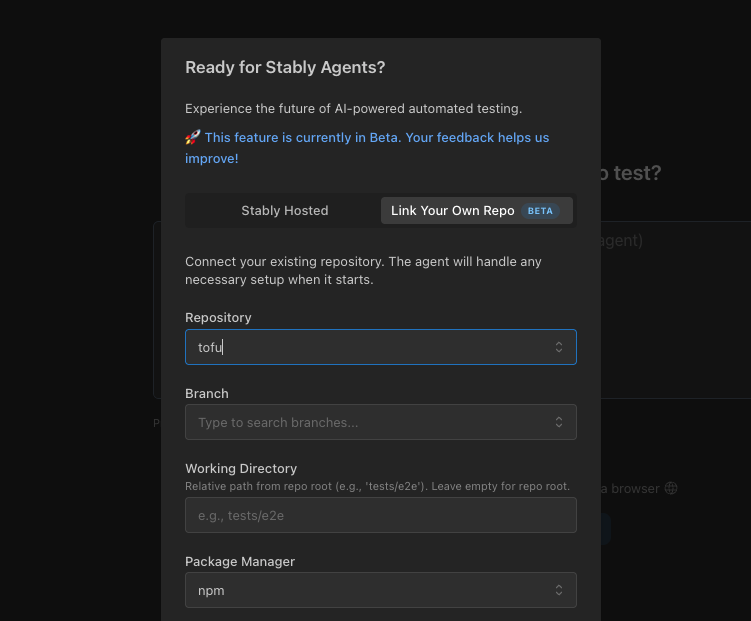
Configuration settings
Configuration settings
- Repository — Select the GitHub repository to connect
- Branch — Choose the branch to sync with (e.g.,
main,develop) - Working Directory — Relative path from repo root where tests live (e.g.,
tests/e2e). Leave empty for repo root. Stably auto-detects existingplaywright.configfiles. - Package Manager — Select your package manager:
npm,pnpm,yarn, orbun - Publish Behavior — Choose how changes are published:
- Create Pull Request — Creates a PR for review before merging
- Push to main branch directly — Pushes changes directly to the main branch
3
Start testing
Create tests with the web editor or CLI—they all sync to your repository automatically.
PR authorship (GitHub)
By default, PRs created by Stably show the Stably bot as the author. You can connect your personal GitHub account so PRs show you as the author instead.To enable: go to Settings > Git and click Connect GitHub in the PR Authorship section.Migrating an existing Stably project
If you already have a Stably project using the managed repository and want to switch to your own:1
Switch to Agent 2.0
Make sure your project is using Agent 2.0. You can check this in your project settings.
2
Export your tests
Go to Settings > Git to export your existing tests. This creates files you can import into your own repository.
3
Connect your repository
Follow the GitHub or GitLab setup steps above to connect your repository.
Troubleshooting
GitLab authentication failed
GitLab authentication failed
If you see “GitLab authentication failed”, your OAuth token may have expired. Re-authorize GitLab in your project settings.
Missing repository permissions
Missing repository permissions
Make sure your GitLab account has write access to the repository you’re trying to connect.
Compatibility
- Git providers: GitHub, GitLab
- Works with any web application — Supports React, Angular, .NET, and any backend framework (e.g., Python, Rust). Our tests simulate real user behavior, so we’re technology agnostic.
Next steps
Web Editor Quickstart
Create your first test in the web editor
CLI Quickstart
Generate tests from your terminal
CI/CD Integration
Run tests in your CI/CD pipeline (no repo connection needed)
GitHub Actions
Run tests with the Stably GitHub Action