

stably fix is a headless command that automatically diagnoses test failures and applies AI-generated fixes. Designed for unattended execution, it’s ideal for self-healing CI pipelines, background maintenance agents, and automated test repair workflows.
For interactive debugging, use the Interactive Agent instead.
stably fix is optimized for automated, hands-off repair.How It Works
1
Run tests
Execute your test suite with
stably test. The Stably Reporter captures failure context — screenshots, traces, DOM snapshots, and logs.2
AI diagnoses each failure
stably fix analyzes the failure context to determine why each test failed and categorizes the issue.3
Fixes are applied
The AI generates targeted code changes and applies them to your test files.
4
Review the results
View the diagnosis report and applied fixes. In CI, fixes can be committed and pushed automatically.
Run ID Detection
stably fix automatically detects which test run to fix using this fallback chain:
- Explicit argument —
stably fix <runId> - CI environment — detected from CI provider variables (GitHub Actions, Azure DevOps, Bitbucket, GitLab, CircleCI, Jenkins, and others via the
env-cilibrary) - Last local run — read from
.stably/last-run.json(written automatically bystably test)
stably test followed by stably fix — no run ID needed.
Using CLI with web portal tests: The CLI works with web portal projects — set
STABLY_PROJECT_ID to the project ID from your dashboard. The CLI has access to all tests, run history, and environments for that project. You can fix cloud runs locally: copy the run ID from the dashboard, run stably fix <runId>.Ad-Hoc Fixing
You don’t need CI to usestably fix. Run it from your terminal any time against any failed run:
- Works with any run ID: local runs, CI runs, or cloud runs
- Fixes are applied to your working tree — review with
git diff, commit when satisfied - Useful for debugging specific failures or testing autofix before wiring into CI
- The fix report is also uploaded to the Stably dashboard for monitoring
Cloud Browser Mode
stably fix can run its browser interactions in a Stably-hosted browser:
- your CI runner is minimal and you do not want local browser setup for the fix agent
- a coding agent is running
stably fixin a container or remote sandbox - you want the CLI workflow but prefer remote browser execution
stably fix still requires a git repository.
Environment Files and Secrets
stably fix does not read, edit, or search .env files (including .env.local, .env.production, and other .env* variants).
- Use
--env <name>to load a named environment from Stably. - Use
--env-file <path>when you explicitly want to provide local environment variables at command startup. - If a failure is caused by missing or invalid environment configuration, the fix agent reports which variables are required instead of modifying secret files.
Diagnosis Categories
Each failure is categorized to help you understand at a glance whether it needs attention or has already been addressed:Monitoring Fix Sessions
Whenstably fix runs, it automatically creates an automation — a real-time view of the agent’s progress visible on the Stably web dashboard. This is especially useful in CI pipelines, Docker containers, and other non-interactive environments where you can’t see the terminal.
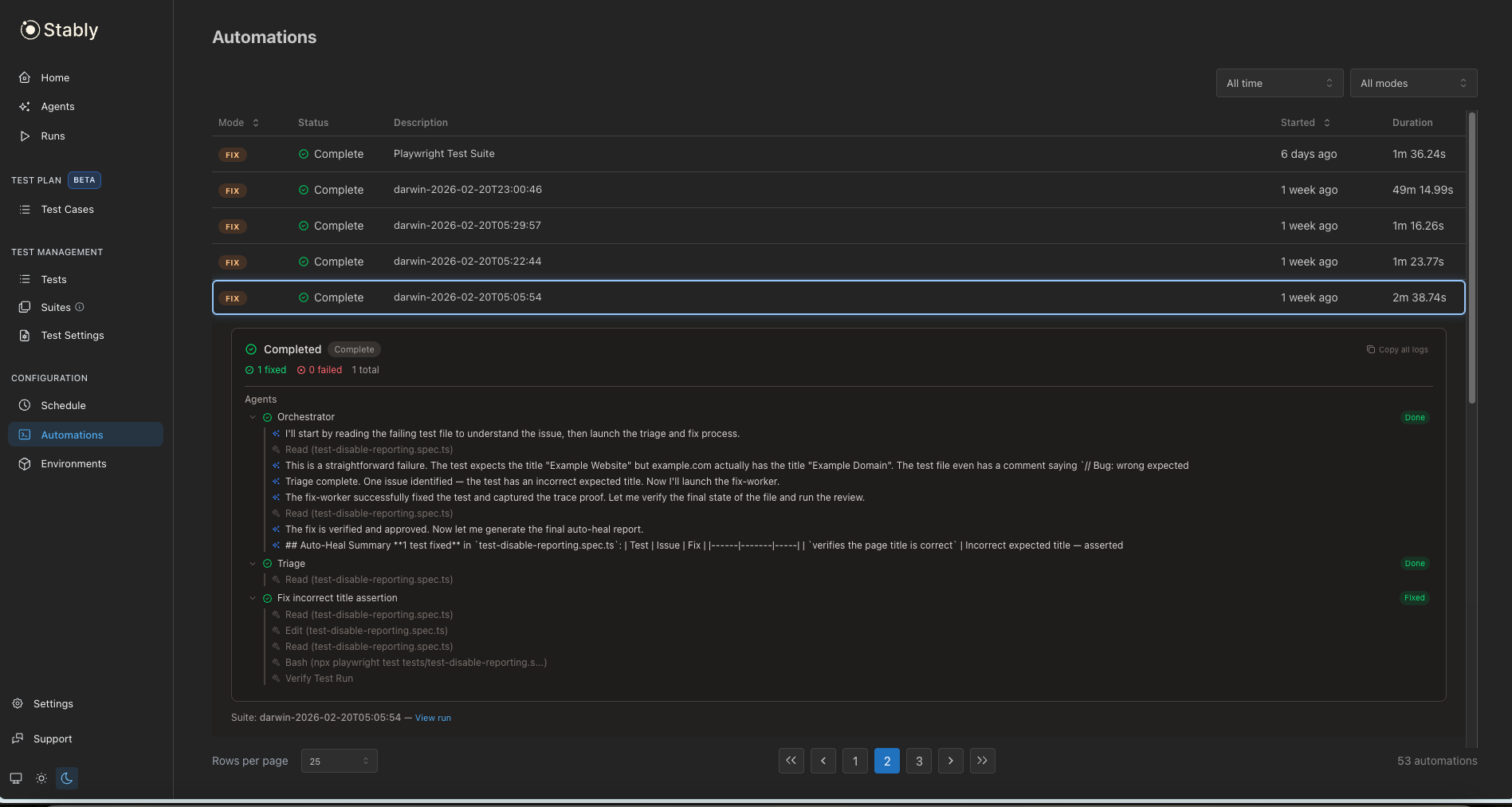
- Watch progress live — see the current phase, activity log, and files being fixed
- Send messages to the agent — provide guidance or corrections while the agent works, even in CI
- View the final report — when complete, the automation shows a summary with links to the autoheal report
initializing → triage → fixing → validation → complete
Automation creation is best-effort and non-blocking. If the connection fails, the CLI continues normally — your commands are never interrupted.
Example Output
Example Output
CI Integration
stably fix applies changes to local files on the CI runner. CI runners are ephemeral — the file changes are lost when the job ends. However, results are always uploaded to the Stably dashboard, so you can review diffs and create a PR from there (if your repo is connected) without any extra CI steps.If you prefer to commit directly from CI, add git commit/push/PR steps to your workflow (shown in the examples below).Simple Pipeline (no matrix)
The recommended pattern runs tests in a parallel matrix and uses a separatefix job that triggers only when tests fail. This ensures stably fix runs once after all test results are collected.
The fix report is also visible on the Stably dashboard regardless of whether you commit/push — results are always uploaded.
Matrix Pipeline (sharded tests)
When using test sharding, runstably fix in a separate job that waits for all shards to complete:
The
fix job uses if: always() && needs.test.result == 'failure' because GitHub Actions skips dependent jobs when needs fail unless always() is used.Background Agent Integration
Autofix on Scheduled Runs
When running tests on Stably Cloud Runner, you can enable autofix to run automatically after each scheduled run — no CLI invocation needed.Enabling Autofix
From the Dashboard: When creating or editing a scheduled test run, toggle “Auto-fix failing tests”. Instably.yaml: Add autofix: true to any schedule definition:
stably.yaml
Viewing Results
After autofix completes, results appear in your test runs table under the “Diagnosis & Fix” column:- In Progress — autofix is still running
- Diagnosed — analysis is complete, with issue counts by category
- Review fix — click to see the full report and code changes
- No fix available — the issue was identified but couldn’t be automatically repaired
- Each failing test with its diagnosis
- The code changes that were applied
- A link to the generated pull request (if your repo is connected to GitHub)
Configuration
Fine-tune how the fix agent behaves — including budget caps, turn limits, and smart skip rules — using theagent.fix section in stably.yaml:
stably.yaml
Next Steps
Run Tests
Run tests locally or in CI with
stably testTest Reporter
Stream test results and traces to Stably
Scheduled Runs
Configure when your tests run automatically
Alerting
Get notified about test failures and fixes